Invoicing and payment for legal entities and Individual Entrepreneurs (IE) - residents of the Russian Federation
Payment is accepted from legal entities/IE-residents of the Russian Federation only from the settlement account by bank transfer of the legal entity/IE for which the office is registered.
Payments from third parties and individuals (for LLC, IE) cannot be automatically identified, and we will be forced to return the funds.
The bank details of the payer in the invoice are not obligatory to be indicated, you can make a payment from the current account of legal entities/IE opened in any bank.
To issue an invoice you need to click the "Issue an invoice" button in your personal account, enter the amount that you will pay.
For the first account top-up, the minimum payment amount is 1,220 rubles. Subsequent payments can be made starting from 610 rubles.
You can see the invoices issued in your personal account in the "Balance" → "Documents" section.
Generated invoices are stored in the system for 3 days. If you need this invoice in the future, we recommend downloading and saving it immediately after the invoice is issued.
For correct and operative crediting of funds to the account it is necessary to make payment from the settlement account of a legal entity specified in the invoice and correctly enter the purpose of payment in the payment order.
The number of the issued invoice has the form: TT-12345678-240326/1002.
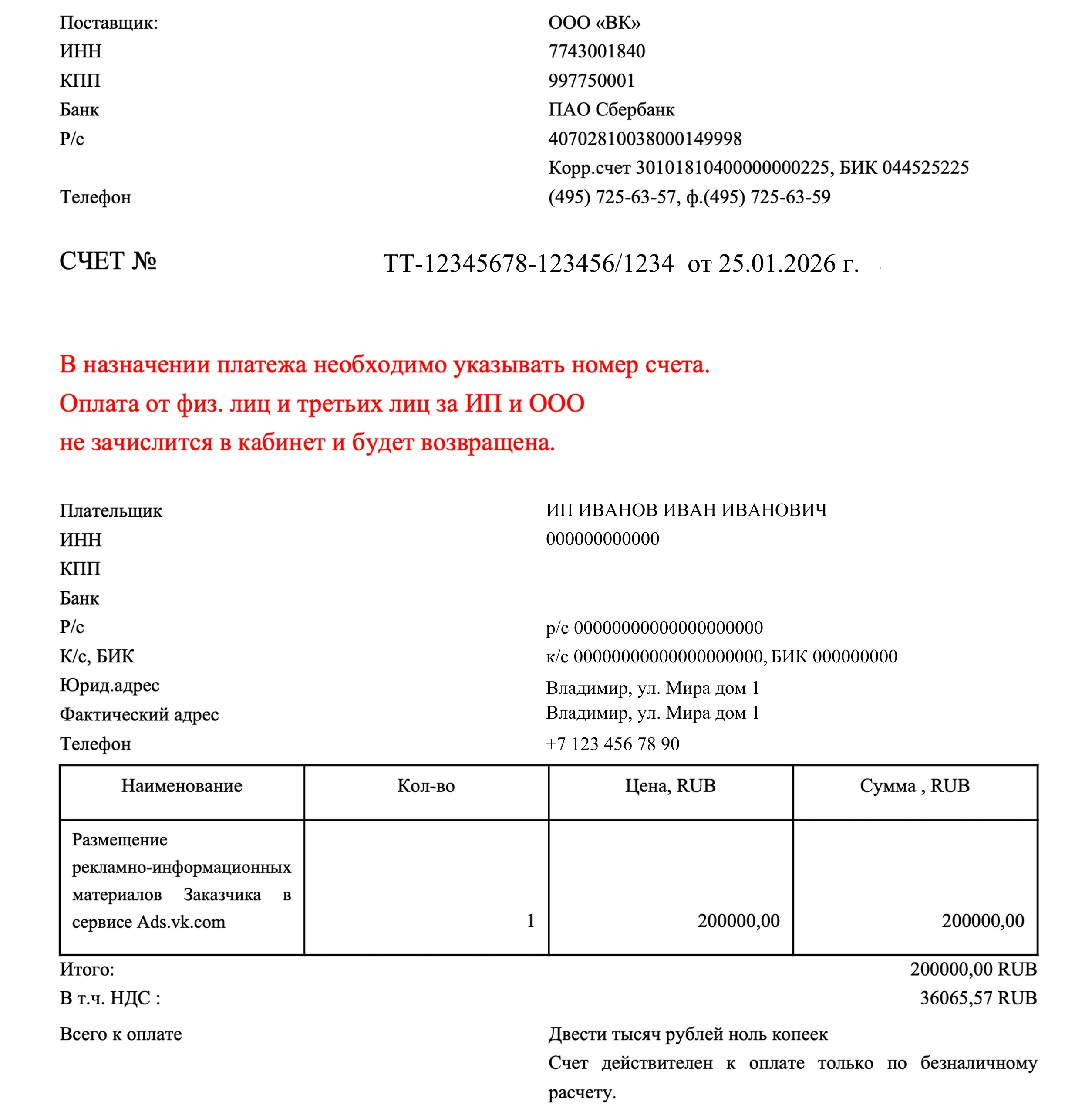
The correct version of a payment order is shown below.
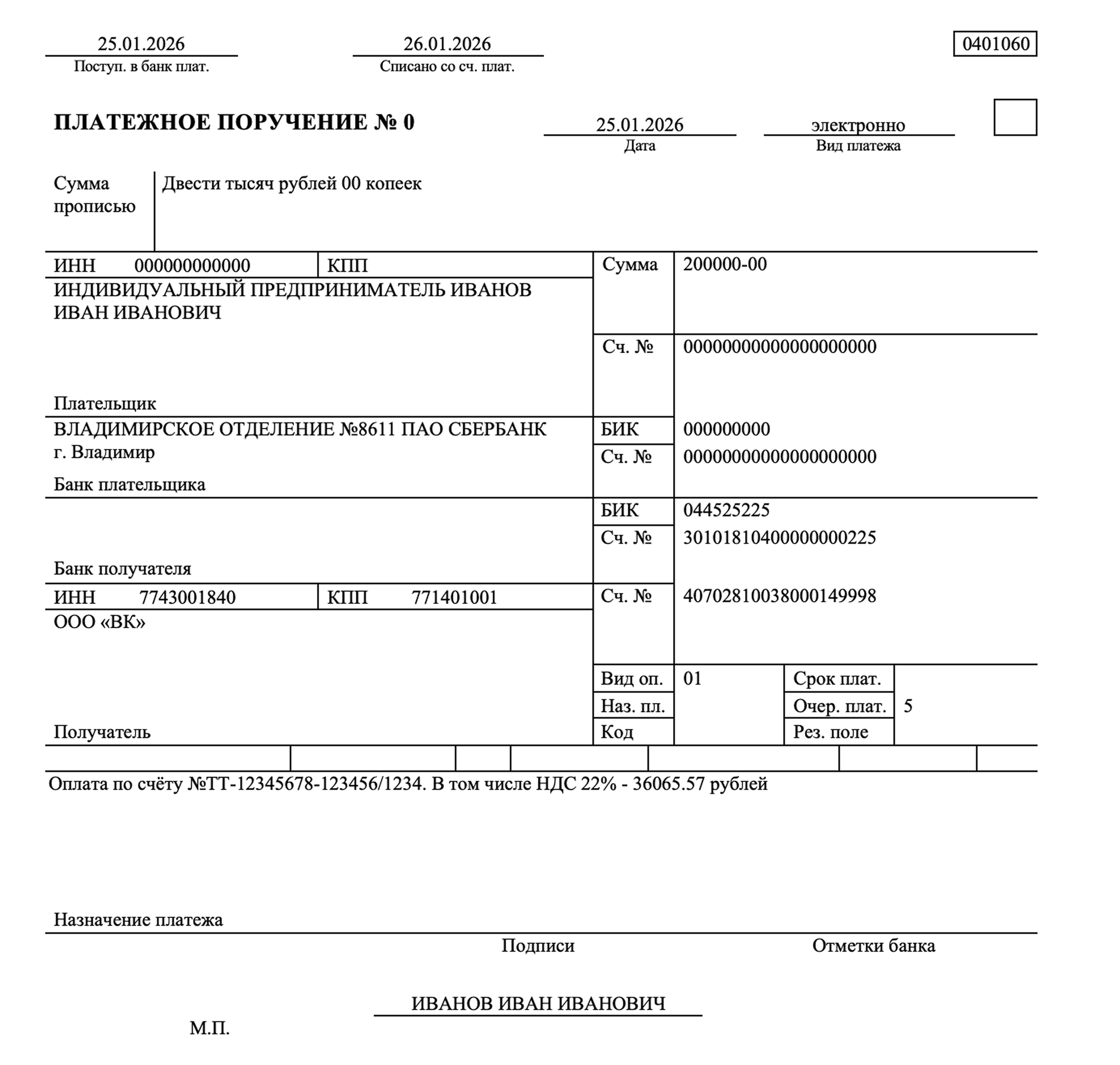
Inform your accountant that entering the correct account number in the purpose of payment will allow your payment to be credited to the office quickly and correctly. Repeated payment of the same invoice is not allowed.
If you find that you did not specify the invoice number after sending the payment, send us a request to target.finance@corp.mail.ru (large clients) or finance.smb@vkteam.ru (SMB). In the request, describe the situation, attach a payment order with the bank's note on debiting funds, and indicate in the email the correct invoice number for crediting funds.
You can check whether your organization belongs to a small and medium-sized business entity in the register of SMEs: https://rmsp.nalog.ru
Deadlines for crediting payments from legal entities/IE-residents of the Russian Federation
Crediting of payments to the account is automatic when money is received on our current account.
The maximum term of receipt of money is 3 working days, provided that the payment was sent without errors. The system identifies the payment by the payer's TIN and the number of the invoice issued from the account. The invoice should be issued from the account to which you want to receive the payment. The system will generate a unique invoice number for you. A new invoice must be issued for each payment. The issued invoice number will have a different number each time.
Closing documents and Electronic document management for legal entities/IE-residents of the Russian Federation
On our site, closing documents are invoiced for the amount of actual money spent in the advertising account for the reporting period/calendar month (not for the amount of the paid invoice). UDD is issued only for the amount spent by you for the reporting month. UPD is a universal transfer document, it is used as a combination of invoice and transfer document (act).
The signed and stamped UDD is uploaded to your personal account in the “Balance” → “Documents” section and is available for download at any time.
Deadline for uploading documents to the account and to Electronic document management (if configured) on the 5th-7th working day of the month following the reporting month.
Example:
You paid on 15.01.24 the amount of 10,000 roubles including VAT, launched an advertising campaign on 02.02.24 and spent 3,000 roubles without VAT.
In this case, you will receive a closing UPD document on the 7th working day of March for the amount of 3,660 roubles including VAT.
Spending is displayed in the office without VAT. VAT is reflected in the closing document.
Please note that we refuse to use paper documents and provide all documents exclusively via Electronic document management. Electronic document management is set up after the documents for the first amount of spending on the account are issued.
To set up Electronic document management you need to provide the following information:
- TIN of the legal entity,
- Account ID,
- Electronic document management operator,
- Your Electronic document management ID.
If you need to upload previously issued documents to Electronic document management, you should send a corresponding request. In addition to the information above, it is necessary to specify the period for which you need to upload closing documents to Electronic document management.
If you want to connect to Electronic document management now, send us an invitation (without attached files), it will be accepted by specialists within two weeks. The possibility to work through the Electronic document management system is stipulated in the offer.
Our Electronic document management system and its identifier:
| ООО "ВК" | Диадок (АО "ПФ "СКБ Контур") | 2BM-7743001840-2012052807514600749280000000000 |
Acts of reconciliation for legal entities/IE - resident of the Russian Federation
Reconciliation acts are uploaded to Electronic document management once a quarter, if you had expenses in a given quarter.
The reconciliation report is submitted on the last day of the closed reporting month.
- 1 quarter from January to March, closing of the quarter from 1 to 20 April, reconciliation acts are uploaded to Electronic document management between 20 and 30 April.
- 2 quarter from April to June, closing of the quarter from 1 to 20 July, reconciliation acts are uploaded to Electronic document management in the period from 20 to 30 July.
- 3 quarter from July to September, closing of the quarter from 1 to 20 October, reconciliation acts are uploaded to Electronic document management in the period from 20 to 30 October.
- 4 quarter from October to December, quarter closure from 1 to 20 January, reconciliation statements are uploaded to Electronic document management between 20 and 30 January.
If you have not received a reconciliation act in EDO in the period from 20th to 30th, you can send us a request in which you need to provide the following data:
- TIN of the legal entity.
- Account ID of the legal entity or number of the contract for which the reconciliation act is required.
- Period of the reconciliation act.
It is not necessary to send a request earlier than the 20th day, it will not be processed, because the period for the formation of the reconciliation act is not closed yet.
Refunds for legal entities/IE - resident of the Russian Federation
Reconciliation acts are uploaded to Electronic document management once a quarter, if you had expenses in a given quarter.
The reconciliation report is submitted on the last day of the closed reporting month.
- 1 quarter from January to March, closing of the quarter from 1 to 20 April, reconciliation acts are uploaded to Electronic document management between 20 and 30 April.
- 2 quarter from April to June, closing of the quarter from 1 to 20 July, reconciliation acts are uploaded to Electronic document management in the period from 20 to 30 July.
- 3 quarter from July to September, closing of the quarter from 1 to 20 October, reconciliation acts are uploaded to Electronic document management in the period from 20 to 30 October.
- 4 quarter from October to December, quarter closure from 1 to 20 January, reconciliation statements are uploaded to Electronic document management between 20 and 30 January.
If you have not received a reconciliation act in EDO in the period from 20th to 30th, you can send us a request in which you need to provide the following data:
- TIN of the legal entity.
- Account ID of the legal entity or number of the contract for which the reconciliation act is required.
- Period of the reconciliation act.
It is not necessary to send a request earlier than the 20th day, it will not be processed, because the period for the formation of the reconciliation act is not closed yet.
Offer for legal entities/IE - residents of the Russian Federation
The services are provided according to the offer that you accepted when registering your account. You will not be able to use a separate agreement based on your organization's template. The text of the offer is available at: https://ads.vk.ru/documents/offer_adv_vk.
The number of the offer agreement is available in your account of the legal entity/sole proprietor in the "Settings" → "General" section. The date of the agreement is the date of confirmation of the account in the system.
Change of registration data in the account of legal entities/IE-residents of the Russian Federation
Changing the legal entity in the account is not provided by the system. It is necessary to register a new account for a new legal entities/IE.
Promised payment
Some prepaid clients can take advantage of the promised payment and work in debt. The amount and repayment period are determined individually and are displayed in the “Balance” section under the “Promised payment” tab.
To use the promised payment:
- Open the “Balance” section → “Promised payment” tab.
- Click “Take a promised payment” — the system will show the calculated maximum amount of the payment and its repayment terms.
- Enter the payment amount and click “Get”.
- The taken promised payment will appear in the list of transactions. Each taken payment has its own buttons for repayment.
- Repay the payment on time.
If the client has not repaid the debt on time, the next payment will go to the debt repayment account. The top-up will be credited to the account until the moment of delay.